Set API rules on a collection
Decide who can list, view, create, update and delete the records of a collection.
Superusers who protect a collection. You need the collection editor under Collections.
A rule is the only gate between a person and the records. An empty rule opens a collection to everyone, including people who are not signed in.
What you will do, in one sentence
Open the API rules tab, keep each rule locked to superusers, and unlock only the rules you need with a filter.
Screens are captured from a seeded test system. Every name, address and number on the screens is invented. Prepared 15 November 2026.
1. The five rules
Open Collections, choose a collection, then choose Collection settings (the gear in the page header). Open the API rules tab.
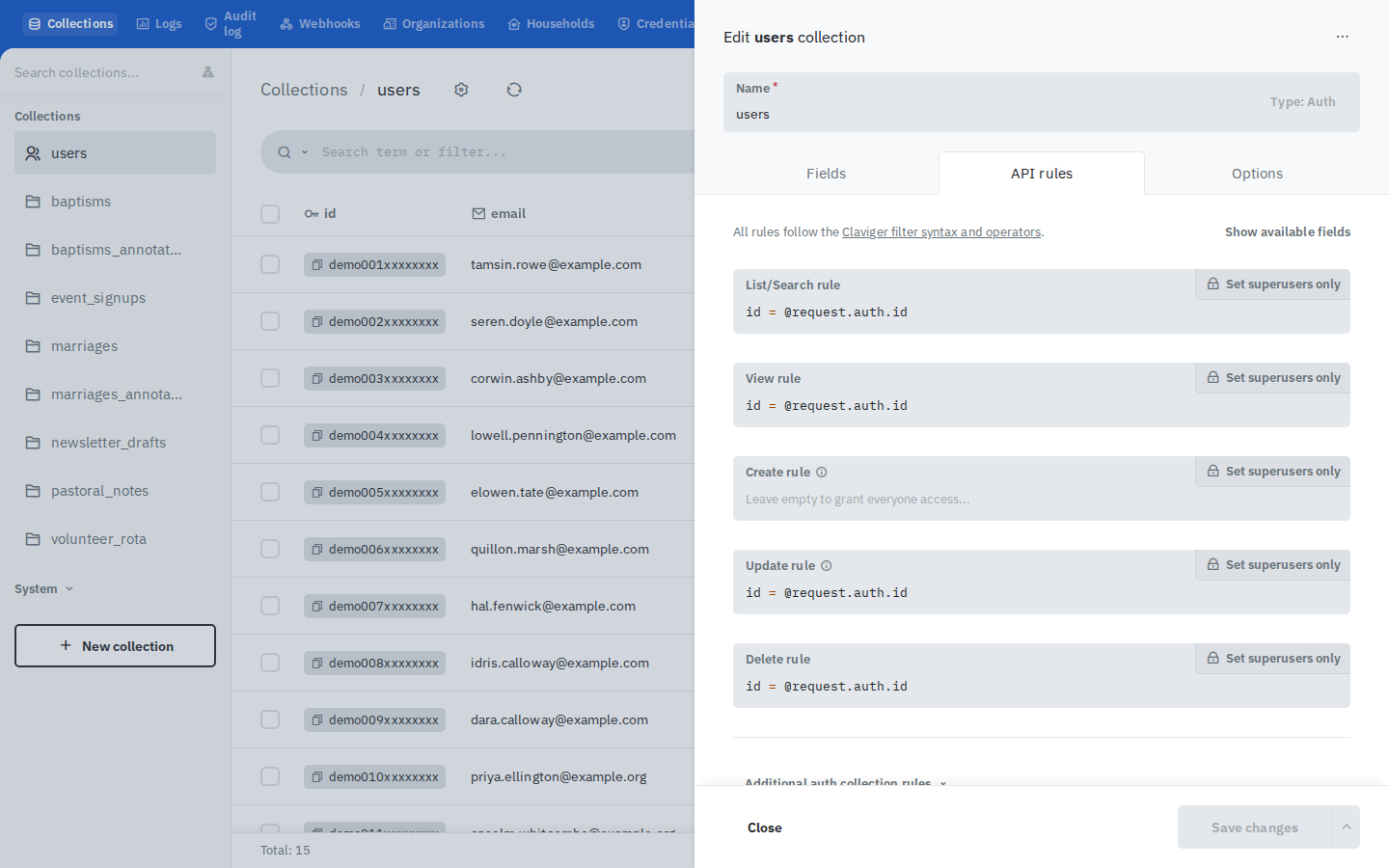
| Rule | Controls |
|---|---|
| List/Search rule | Which records a person can list or search. |
| View rule | Which single record a person can open. |
| Create rule | Who can add a record. |
| Update rule | Who can change a record. |
| Delete rule | Who can remove a record. |
A view collection has only List/Search rule and View rule.
2. Locked, open and filtered
Each rule is in one of three states.
| State | What you see | Who gets in |
|---|---|---|
| Locked | The label shows (Superusers only). | Superusers only. |
| Empty | Placeholder: Leave empty to grant everyone access... | Everyone, signed in or not. |
| A filter | Your expression. | People for whom the expression is true. |
- Choose Unlock and set custom rule to edit a locked rule.
- Type a filter, or leave the box empty to open the rule to everyone.
- Choose Set superusers only to lock the rule again.
- Save the collection.
Example filter: @request.auth.id != "" lets any signed-in account in. Choose Show available fields to see the record fields you can use. You can also use @request.auth.*, @request.body.*, @request.query.*, @request.headers.* and @collection.NAME.*.
Empty is not the same as locked. Check each rule before you save. For a collection with personal data, start locked and unlock one rule at a time.
In the Update rule, the record fields hold the old values. To test the new values, use @request.body.*. System collections show the rules but you cannot change them.
3. Extra rules for auth collections
An auth collection has a button, Additional auth collection rules.
- Authentication rule runs before every sign-in. Leave it empty to let anyone with an account sign in. A filter such as
verified = trueallows only verified accounts. Locking it turns sign-in off. - Manage rule adds superuser-like power to the create and update rules. A person who passes it can change a password without the old one and set the verified state or the email directly.
Anyone who passes the manage rule can take over the accounts it covers. Give it to as few people as you can.
4. Watch reads of sensitive collections
Rules decide who may read. The audit log tells you who did. Flag sensitive collections under Settings, Application, Audit log. See the audit log guide.
5. Quick reference card
Lock a rule
- API rules tab.
- Set superusers only.
- Save.
Open a rule to signed-in accounts
- Unlock and set custom rule.
- Type
@request.auth.id != "". - Save.
An empty rule is open to everyone.